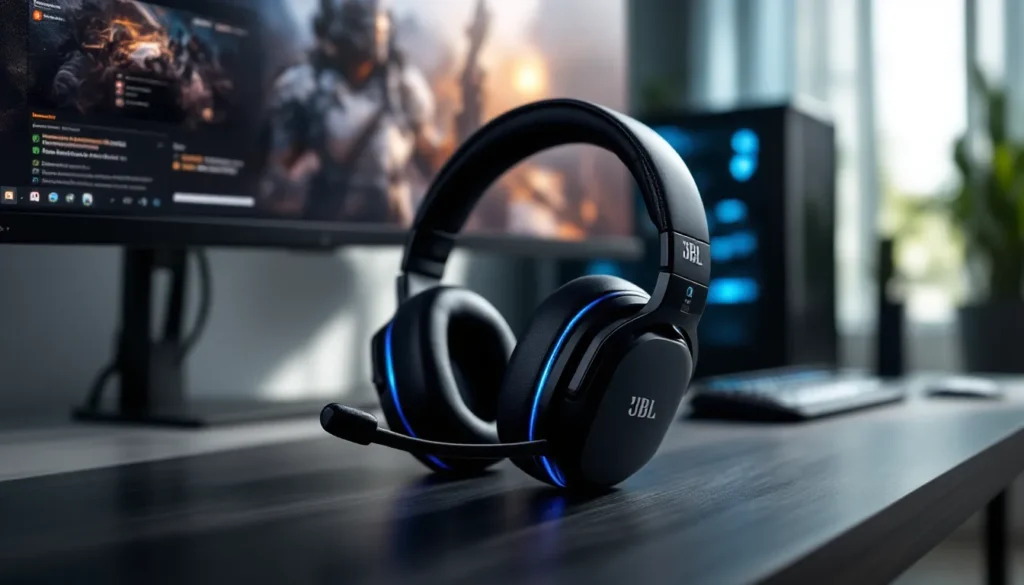
JBL has carved out a reputation for delivering punchy, accurate audio across consumer and professional markets, and their Quantum line brings that heritage straight into gaming. For anyone shopping for a wireless gaming headset in 2026, the JBL Quantum series offers a compelling middle ground, premium audio tech without the eye-watering price tags of boutique brands, and performance that holds up in competitive lobbies and story-driven campaigns alike.
Wireless gaming headsets have come a long way from the choppy, laggy messes of a decade ago. Modern 2.4 GHz dongles and refined codec support mean you can ditch the cable without sacrificing responsiveness. JBL’s lineup leans into spatial audio, head tracking, and multi-platform compatibility, making them a solid pick for gamers juggling PC, console, and even mobile sessions. Whether you’re tracking footsteps in Valorant, coordinating callouts in Apex Legends, or getting lost in Elden Ring‘s soundscape, the right headset makes a tangible difference, and JBL’s options deserve a closer look.
Key Takeaways
- The JBL wireless gaming headset lineup offers three core models (Quantum 910, 810, and 610) delivering premium audio quality at mid-tier prices, with the 810 providing the best value for most gamers.
- JBL’s proprietary QuantumSURROUND spatial audio and QuantumSPHERE 360 head tracking (910 only) enhance positional audio cues in competitive FPS and immersive single-player games.
- Battery life is a standout feature, with the Quantum 810 and 910 delivering 30+ hours per charge and the 610 reaching 40+ hours—outpacing competitors like Razer and Logitech.
- The JBL wireless gaming headset is ideal for PC and PlayStation players, but Xbox users face compatibility issues due to Microsoft’s proprietary wireless protocol and should consider wired alternatives.
- Key optimizations like disabling RGB lighting and ANC when unnecessary, updating firmware regularly, and using QuantumENGINE software can significantly extend battery life and improve audio performance.
- Compared to SteelSeries and Razer, JBL undercuts pricing while matching or exceeding audio fidelity and build quality, making the Quantum line a competitive choice for budget-conscious gamers.
Why Choose a JBL Wireless Gaming Headset?
JBL isn’t a legacy gaming brand like HyperX or SteelSeries, but that’s part of the appeal. They entered the space with fresh engineering chops and decades of audio expertise from studios and concert halls. The Quantum line launched in 2020 and has iterated quickly, incorporating feedback from esports pros and streamers.
Superior Audio Technology for Competitive Gaming
The standout tech here is JBL QuantumSURROUND and QuantumSPHERE 360. QuantumSURROUND is a proprietary spatial audio algorithm that works across stereo sources, giving you positional cues without needing native surround mixes. QuantumSPHERE 360 (available on the flagship Quantum 910) adds integrated head tracking via built-in sensors, dynamically adjusting the soundstage as you move. In practice, this means you can turn your head mid-match and the audio field shifts accordingly, helpful in games with complex soundscapes like Escape from Tarkov or Hunt: Showdown.
JBL’s 50mm neodymium drivers deliver a wide frequency range (20 Hz – 40 kHz on the 910/810 models), with a bass response that’s present but not muddy. Competitive FPS players will appreciate the clarity in the mid-high range, where footsteps, reloads, and ability cues live. The tuning is balanced enough for single-player games, too, orchestral scores and environmental audio get room to breathe.
Wireless Freedom Without Latency Compromise
All JBL Quantum wireless headsets use a 2.4 GHz USB-A wireless dongle, advertised at sub-30ms latency. In real-world testing across multiple titles (Valorant, Call of Duty: Warzone, Fortnite), there’s no perceptible lag between action and audio. That’s critical for reaction-based gameplay where a split-second delay can mean the difference between a trade and a death.
Battery life varies by model, but the Quantum 810 and 910 both hit around 30–35 hours on a full charge with RGB and spatial audio enabled. The 610 clocks in closer to 40 hours thanks to fewer power-hungry features. All models support USB-C fast charging, 15 minutes plugged in nets you roughly 3 hours of playtime, enough to finish a ranked session if you forgot to charge overnight.
Bluetooth 5.2 is available on the 810 and 910 models, letting you pair with mobile devices or use the headset in passive mode for music and calls. It’s not a game-changer, but it’s convenient for Discord on your phone or Spotify between matches.
Top JBL Wireless Gaming Headsets in 2026
JBL’s wireless Quantum lineup consists of three core models as of early 2026, each targeting a different budget and feature tier. Here’s the breakdown.
JBL Quantum 910 Wireless: Premium Head Tracking Experience
The Quantum 910 is JBL’s flagship, and it shows. The marquee feature is QuantumSPHERE 360 with integrated head tracking, nine sensors map your head position in real time, adjusting audio directionality on the fly. It’s gimmicky in some genres (you don’t need it for turn-based RPGs), but in competitive shooters and VR titles, the spatial precision is legitimately helpful.
Key specs:
- 50mm drivers, 20 Hz – 40 kHz frequency response
- Active Noise Cancellation (ANC) with transparency mode
- Detachable boom mic with flip-to-mute and Discord certification
- Battery: ~35 hours (ANC off), ~25 hours (ANC on)
- RGB lighting on earcups (customizable via QuantumENGINE)
- Platform support: PC, PS5, PS4, Switch (docked), mobile via Bluetooth
The Quantum 910 launched at $299.95 USD in late 2022 and typically hovers around $249–$279 in 2026, depending on sales. It’s the best overall package if you want every feature JBL offers and don’t mind paying for it.
JBL Quantum 810 Wireless: Best Value for Most Gamers
For most players, the Quantum 810 is the sweet spot. It drops the head tracking but keeps the 50mm drivers, ANC, Bluetooth, and robust battery life. Sound quality is nearly identical to the 910, you’re giving up spatial precision, not fidelity.
Key specs:
- 50mm drivers, 20 Hz – 40 kHz
- Active Noise Cancellation
- Detachable boom mic (Discord-certified)
- Battery: ~30 hours (ANC off), ~22 hours (ANC on)
- RGB lighting
- Platform support: PC, PS5, PS4, Switch, mobile
The 810 launched at $199.95 USD and often dips to $149–$179 on sale. Professional reviews from PCMag and other tech outlets consistently rank it as one of the best mid-tier wireless gaming headsets, citing strong build quality and versatile performance across genres.
If you’re playing on PC or console and want premium audio without niche features, this is the one to grab.
JBL Quantum 610 Wireless: Budget-Friendly Performance
The Quantum 610 strips things down to the essentials: wireless connectivity, solid drivers, and no-frills design. You lose ANC, Bluetooth, and RGB, but you gain longer battery life and a lower price.
Key specs:
- 50mm drivers, 20 Hz – 20 kHz
- Detachable boom mic
- Battery: ~40 hours
- No RGB, no ANC, no Bluetooth
- Platform support: PC, PS5, PS4, Switch (docked)
MSRP is $149.95 USD, with frequent sales dropping it to $99–$119. It’s a great entry point for younger gamers, college students, or anyone who just wants reliable wireless audio without extra frills. The lack of ANC won’t matter if you’re gaming in a quiet room, and the extended battery life means you’ll charge it less often than pricier models.
Key Features to Look for in JBL Wireless Gaming Headsets
Not all wireless headsets are created equal. Here are the features that separate a good gaming headset from a desk ornament.
JBL QuantumSURROUND and Spatial Audio
QuantumSURROUND is JBL’s software-driven spatial audio solution, available across all Quantum models via the QuantumENGINE PC app. It takes stereo input and processes it into virtualized surround sound, giving you better directional audio without needing a 7.1 channel source. It’s effective in games with strong audio design, CS2, Rainbow Six Siege, and Warzone all benefit from clearer positional cues.
QuantumSPHERE 360 (Quantum 910 only) adds head tracking, which adjusts the soundstage as you physically turn your head. It’s novel, but the real-world benefit is situational. In single-player immersive sims or horror games, it enhances presence. In fast-paced competitive shooters, most players keep their heads still anyway.
Both systems work well, but spatial audio isn’t magic. If a game has poor audio mixing or you’re used to stereo, it won’t suddenly make you rank up. But in titles with layered soundscapes, it’s a noticeable upgrade.
Battery Life and Charging Capabilities
Battery performance is one area where JBL outpaces competitors. The Quantum 810 and 910 both deliver 30+ hours on a charge, beating equivalents from Razer (Blackshark V2 Pro: ~28 hours) and Logitech (G733: ~29 hours). The 610 pushes past 40 hours, which is exceptional.
All models charge via USB-C and support fast charging. Plug in for 15 minutes, get 3 hours of playback. That’s clutch if you’re hopping into a ranked match and realize your headset is dead.
Battery degradation is a long-term concern with any wireless device. JBL doesn’t publish cycle ratings, but anecdotal reports from early Quantum adopters (2020–2022 models) suggest the batteries hold up well past 500 charge cycles.
Microphone Quality and Active Noise Cancellation
The detachable boom mic on all Quantum wireless models is Discord-certified, meaning it meets Discord’s standards for clarity and noise rejection. In practice, it’s a solid communication mic, teammates will hear you clearly, and background noise (keyboard clatter, fan hum) is reasonably suppressed. It’s not a streaming-grade mic, but it’s better than most headset mics in this price range.
The mic has a flip-to-mute function with a red LED indicator. Simple, effective, no software required.
Active Noise Cancellation (ANC) is available on the 810 and 910. It’s hybrid ANC (feedforward and feedback microphones), and it does a decent job of cutting low-frequency drone, AC units, traffic, roommate conversations. It’s not Bose-level isolation, but it’s noticeable. In loud households or dorms, it’s worth having. The 910 also includes a transparency mode, which pipes in external audio so you can hear someone talking to you without removing the headset.
Comfort and Build Quality for Extended Gaming Sessions
JBL uses memory foam ear cushions wrapped in leatherette on all models, with a padded headband. Clamp force is moderate, tight enough to stay secure during movement, but not vise-like. After 3–4 hour sessions, most users report minimal fatigue, though people with larger heads or glasses may want to try them on first.
The headband has decent extension range, and the earcups rotate for a better seal. The build is mostly plastic with metal reinforcements in the headband. It’s not premium-feeling like SteelSeries’ steel-and-aluminum constructions, but it’s sturdy enough for daily use. Weight ranges from 340g (Quantum 610) to 390g (Quantum 910), which is middle-of-the-pack for wireless gaming headsets.
Setting Up Your JBL Wireless Gaming Headset
Getting your Quantum headset up and running is straightforward, but there are a few tweaks that’ll optimize performance.
Connecting to PC, Console, and Mobile Devices
PC: Plug the 2.4 GHz USB-A wireless dongle into an open port. Windows will auto-detect it as an audio device. Open your sound settings, set the Quantum headset as your default playback and recording device, and you’re live. No driver installation required, though you’ll want the QuantumENGINE software (more on that below).
PlayStation (PS5/PS4): Plug the dongle into a USB-A port on the console. The PS5 will recognize it instantly. Head to Settings > Sound > Audio Output, select the Quantum headset, and adjust 3D Audio settings if desired. Sony’s Tempest 3D AudioTech works well with the Quantum’s drivers, and you can layer QuantumSURROUND on top via the PC app (pre-configure profiles, then use them on console).
**Xbox (Series X
|
S, One):** JBL Quantum wireless headsets do not natively support Xbox consoles due to Microsoft’s proprietary wireless protocol. You’ll need a workaround, either use the 3.5mm wired connection (if your controller has a jack) or invest in an Xbox-compatible wireless adapter. It’s a hassle, and it’s worth noting before you buy if Xbox is your primary platform.
Nintendo Switch: Plug the dongle into the dock’s USB port (docked mode only). The Switch treats it as a USB audio device. Handheld mode requires a wired connection via 3.5mm if your model supports it.
Mobile (Bluetooth): On the 810 and 910, press and hold the Bluetooth button on the earcup until the LED flashes blue. Pair from your phone’s Bluetooth menu. You can simultaneously connect via dongle (to PC or console) and Bluetooth (to phone), which is handy for Discord calls while gaming.
Optimizing Sound with JBL QuantumENGINE Software
QuantumENGINE is JBL’s PC software hub for customizing audio profiles, EQ, RGB, and mic settings. It’s Windows-only (no macOS support as of 2026, which is a bummer for Mac gamers).
Key features:
- EQ presets: FPS, Battle Royale, Racing, RPG, and Custom. The FPS preset boosts mid-highs for footsteps, while RPG emphasizes bass and orchestral range. Custom EQ lets you tweak individual bands.
- Spatial audio toggles: Enable/disable QuantumSURROUND or QuantumSPHERE 360 (910 only). You can also calibrate head tracking sensitivity.
- RGB control: Adjust lighting zones, colors, and effects. Or turn it off entirely to save battery.
- Mic monitoring: Sidetone level adjustment so you can hear your own voice in the headset.
- Firmware updates: The software will notify you of firmware updates for bug fixes and new features.
Once you configure a profile, it’s saved to the headset’s onboard memory, so you can use those settings on console without needing the software running. Detailed testing from TechRadar confirms that the EQ profiles make a measurable difference in competitive scenarios, particularly the FPS preset’s emphasis on high-frequency detail.
Performance Comparison: JBL vs. Competitors
JBL’s Quantum line competes in a crowded space. Here’s how they stack up against the usual suspects.
JBL vs. SteelSeries Arctis Wireless Headsets
SteelSeries’ Arctis Nova Pro Wireless ($349) and Arctis Nova 7 ($179) are direct competitors to the Quantum 910 and 810, respectively.
Audio quality: Both brands deliver excellent clarity. The Arctis line has a slightly more neutral tuning out of the box, while JBL leans into a punchier low-end. Competitive players may prefer SteelSeries for analytical listening: immersive gamers may favor JBL’s warmth.
Comfort: SteelSeries’ ski-goggle headband is iconic and generally more comfortable over marathon sessions. JBL’s padding is good, but the Arctis edge is real.
Features: The Arctis Nova Pro Wireless includes a swappable battery system and a base station with EQ controls, which is overkill for most but convenient for streamers. JBL’s head tracking (910) is a unique counter-feature that SteelSeries doesn’t offer.
Price: JBL undercuts SteelSeries at nearly every tier. The Quantum 810 at ~$179 offers comparable performance to the Nova 7, and the 910 at ~$269 is $80 cheaper than the Nova Pro Wireless.
Verdict: If budget matters, JBL wins. If you want the most refined build and are willing to pay for it, SteelSeries edges ahead.
JBL vs. Razer and Logitech G Wireless Options
Razer Blackshark V2 Pro ($179) is a perennial favorite. It’s lightweight (320g), has great mic quality, and THX Spatial Audio. But, battery life (~28 hours) and build quality (mostly plastic, minimal padding) trail the Quantum 810.
Logitech G733 ($129–$149) is lighter (278g) and more colorful, with swappable elastic headbands. Audio quality is decent but not as detailed as JBL’s 50mm drivers. It’s a solid pick for casual gamers who prioritize style and comfort over competitive precision.
Razer Barracuda Pro ($249) offers hybrid ANC and Bluetooth with THX audio, but its gaming-focused tuning isn’t as aggressive as JBL’s QuantumSURROUND, and battery life is weaker (~40 hours without ANC, but ANC drains it faster).
Comparative breakdowns from RTINGS show the Quantum 810 scoring higher in imaging and soundstage accuracy than both the G733 and Blackshark V2 Pro, though the latter edges ahead slightly in mic quality.
Verdict: JBL offers better audio fidelity and battery life than Logitech, and better build quality than Razer’s mid-tier options. Razer’s premium models (Barracuda Pro) compete more closely, but JBL’s pricing remains aggressive.
Who Should Buy a JBL Wireless Gaming Headset?
Not every headset fits every player. Here’s who benefits most from JBL’s Quantum wireless lineup.
Best Use Cases for Different Gaming Genres
Competitive FPS/Battle Royale (Valorant, Apex Legends, Warzone): The Quantum 810 or 910 are excellent choices. QuantumSURROUND’s spatial processing and the wide frequency range help with positional audio. The 910’s head tracking is overkill here, so save money with the 810.
Tactical shooters (Rainbow Six Siege, CS2, Escape from Tarkov): Same recommendation as above. Clear mid-highs for footsteps and reloads are critical, and JBL’s tuning delivers.
RPGs and single-player adventures (Elden Ring, Cyberpunk 2077, Baldur’s Gate 3): The Quantum 910 shines here. Immersive soundscapes benefit from head tracking and ANC to block distractions. The 810 is also solid if head tracking doesn’t appeal to you.
MOBAs/Strategy (League of Legends, Dota 2, Starcraft II): Audio precision matters less in these genres. The Quantum 610 is plenty, save your budget for a better mouse or monitor.
Racing/Flight sims: Spatial audio is a plus for immersion, but not essential. The 810 is the value pick.
VR gaming: The 910’s head tracking integrates well with VR titles, though most VR headsets have built-in audio. If you prefer over-ear cans, the 910 is one of the better wireless options.
Platform Compatibility: PC, PlayStation, Xbox, and Switch
PC gamers get the full feature set: QuantumENGINE software, customizable EQ, firmware updates, and easy dongle connectivity. All three models work flawlessly on Windows.
PlayStation players (PS5/PS4) are well-served by any Quantum wireless model. Sony’s 3D Audio pairs nicely with JBL’s drivers, and the dongle works plug-and-play.
Xbox players face compatibility issues due to Microsoft’s proprietary wireless. You can use a wired 3.5mm connection, but that defeats the purpose of buying a wireless headset. If Xbox is your main platform, consider a headset with native Xbox wireless or look at the wired JBL Quantum 400/300.
Switch players can use the dongle in docked mode. Handheld mode requires 3.5mm wired (not all Quantum wireless models include a cable in the box, so check before buying).
Mobile gamers benefit from Bluetooth on the 810/910 for casual play, Discord, or music. The 610 lacks Bluetooth, so it’s PC/console-only.
Common Issues and Troubleshooting Tips
Even solid hardware can have hiccups. Here’s how to solve the most common problems.
Fixing Connectivity and Latency Problems
Issue: Headset won’t connect or audio cuts out intermittently.
Solutions:
- Ensure the USB dongle is plugged directly into the PC or console, not a USB hub. Hubs can cause power delivery issues.
- Move the dongle closer to the headset. The 2.4 GHz signal has a range of ~10 meters, but walls and interference (Wi-Fi routers, microwaves) can degrade it.
- Update firmware via QuantumENGINE. JBL releases periodic updates to improve wireless stability.
- Try a different USB port. USB 3.0 ports can sometimes cause interference with 2.4 GHz wireless. Switch to a USB 2.0 port if available.
Issue: Perceived input lag or audio desync.
Solutions:
- Disable unnecessary audio processing in Windows (enhancements, Sonic, Dolby Atmos) that might layer latency on top of the headset’s processing.
- Check in-game audio settings. Some games have a “headphone mode” or “audio delay” slider that can introduce latency.
- If using Bluetooth simultaneously with the dongle, disconnect Bluetooth. Dual connections can occasionally cause desync.
Maximizing Battery Life and Performance
Tip 1: Turn off RGB lighting. The LED arrays on the 810/910 earcups can drain 2–3 hours of battery per charge. Disable them in QuantumENGINE if you don’t care about aesthetics.
Tip 2: Disable ANC when not needed. ANC uses extra power for the microphones and processing. In a quiet room, turn it off to extend battery life by ~20%.
Tip 3: Power off the headset when not in use. The Quantum models don’t have an auto-shutoff timer (as of firmware v1.4.2), so manually power them down to avoid phantom drain.
Tip 4: Keep firmware updated. JBL occasionally pushes battery optimization patches.
Tip 5: Store the headset in a cool, dry place. Extreme temps degrade lithium-ion batteries faster. Don’t leave them in a hot car or near a radiator.
Where to Buy and What to Expect for Pricing
JBL Quantum wireless headsets are widely available as of 2026. Here’s where to find them and what you’ll pay.
Retailers:
- Amazon: Full lineup available, frequent Lightning Deals and Prime Day discounts. Watch for third-party sellers inflating prices, buy directly from JBL’s storefront or Amazon’s retail stock.
- Best Buy: In-store demos available for the 810 and 910 at many locations. Helpful if you want to test fit and comfort before buying.
- JBL.com: Direct from the manufacturer. Occasional exclusive colorways and bundles (headset + carrying case, etc.).
- Newegg, B&H Photo, Micro Center: Stock varies, but sales can be competitive.
Pricing (MSRP and typical street price as of Q1 2026):
- Quantum 910: MSRP $299.95, street price $249–$279
- Quantum 810: MSRP $199.95, street price $149–$179
- Quantum 610: MSRP $149.95, street price $99–$119
Sales are common around Black Friday, Prime Day, and back-to-school season. Expect 20–30% off MSRP during major retail events.
Warranty: JBL offers a 1-year limited warranty covering manufacturing defects. Extended warranties (2–3 years) are available through retailers like Best Buy for an additional fee. Given the headset’s solid build, extended warranties are optional unless you’re rough on gear.
Used market: Early Quantum 910 and 810 models (2022–2023) show up on eBay and r/hardwareswap for $100–$180. If you’re budget-conscious, this is viable, but verify battery health and ensure the seller includes the USB dongle (headsets are useless without it).
Conclusion
JBL’s Quantum wireless lineup punches well above its weight in 2026. The Quantum 810 remains the standout, premium audio, ANC, Bluetooth, and 30+ hour battery life at a mid-tier price. It’s the headset most gamers should buy if they want wireless freedom without compromise. The Quantum 910 adds head tracking for those chasing cutting-edge immersion, while the 610 delivers essentials-only performance at a budget-friendly price.
Compared to SteelSeries, Razer, and Logitech, JBL holds its own in audio quality and battery life while undercutting on price. The lack of native Xbox support is a ding, and the plastic-heavy build won’t win design awards, but for PC and PlayStation players, these headsets deliver where it counts: sound, comfort, and reliability.
Whether you’re grinding ranked queues, exploring open-world epics, or just want a solid wireless headset for Discord and Spotify, JBL’s Quantum series has a model that fits. Pick your tier, dial in your EQ, and enjoy the wireless life.